How to use Geolocation and Yahoo's APIs to build a simple weather webapp
Today we will be using the HTML5 geolocation API to present the user with a personalized weather forecast. Using jQuery, we will issue AJAX request to two of Yahoo's popular APIs to obtain additional geographical information and a weather forecast. This example also makes use of the wonderful climacons icon set.
Update: Yahoo have discontinued their free geolocation api, which means that this tutorial will no longer work. However we created an improved version which uses the APIs provided by OpenWeatherMap. See the tutorial here.
Obtaining an Application Key
Yahoo provides a large collection of useful APIs that are free for developers to use. The requirement is that you register your application with through their developer dashboard. The registration is simple and straightforward, and as a result you obtain an application id (look for it under the title of your application). You are going to need this later in the tutorial, but first let's see how everything would work together.
The Idea
Here is what we need to do in order to display our weather forecast:
- First we'll use the Geolocation API supported by modern browsers. The API will prompt the user to authorize location access and will return a set of GPS coordinates;
- Next, we will issue a request to Yahoo's PlaceFinder API, passing the above coordinates. This will give us the name of the city and country, and a woeid - a special ID used to identify the city in weather forecasts;
- Finally, we will issue a request to Yahoo's Weather API with that woeid. This will give us current weather conditions, as well as a forecast for the rest of the current and the next day.
Great! We are now ready for the HTML.
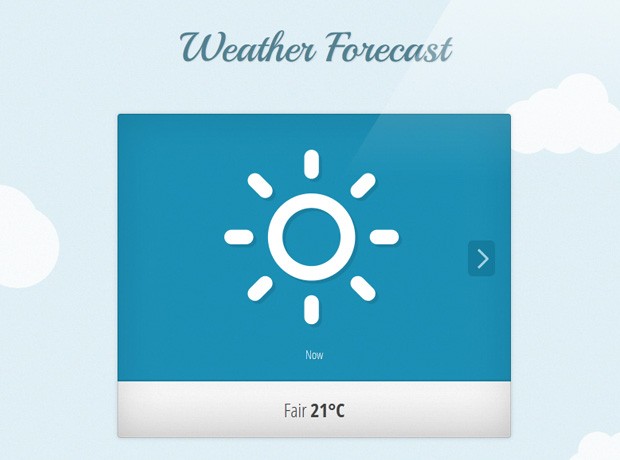
The HTML
We will start with a blank HTML5 document, and we will add a reference to our stylesheet to the head section, along with two fonts from Google's Webfonts library. In the body we will add a h1 header and markup for the weather forecast slider.
index.html
<!DOCTYPE html>
<html>
<head>
<meta charset="utf-8" />
<title>Weather Forecast with jQuery & Yahoo APIs | Tutorialzine Demo</title>
<!-- The stylesheet -->
<link rel="stylesheet" href="assets/css/styles.css" />
<!-- Google Fonts -->
<link rel="stylesheet" href="http://fonts.googleapis.com/css?family=Playball|Open+Sans+Condensed:300,700" />
<!--[if lt IE 9]>
<script src="http://html5shiv.googlecode.com/svn/trunk/html5.js"></script>
<![endif]-->
</head>
<body>
<header>
<h1>Weather Forecast</h1>
</header>
<div id="weather">
<ul id="scroller">
<!-- The forecast items will go here -->
</ul>
<a href="#" class="arrow previous">Previous</a>
<a href="#" class="arrow next">Next</a>
</div>
<p class="location"></p>
<div id="clouds"></div>
<!-- JavaScript includes - jQuery, turn.js and our own script.js -->
<script src="http://code.jquery.com/jquery-1.7.2.min.js"></script>
<script src="assets/js/script.js"></script>
</body>
</html>
Before the closing body tag we are adding the latest version of jQuery and our script.js file, which we are discussing in the following sections.
The JavaScript
The first step is to define two configuration variables in /assets/js/script.js:
var APPID = '';   // Your Yahoo Application ID
var DEG = 'c';  // c for celsius, f for fahrenheit
These are passed as parameters with the AJAX requests for the location and weather APIs as you will see in a moment.
Following the outline in the idea section, we should now look into using the HTML5 Geolocation API to obtain a set of GPS coordinates. This API is supported by all new browsers including IE9 and mobile devices. To use it, we need to test whether the global navigator object has a geolocation property. If it does, we call its getCurrentPosition method passing two event handling functions for success and failure. Here is the relevant code from script.js that does this:
// Does this browser support geolocation?
if (navigator.geolocation) {
    navigator.geolocation.getCurrentPosition(locationSuccess, locationError);
}
else{
    showError("Your browser does not support Geolocation!");
}

function locationSuccess(position) {
    var lat = position.coords.latitude;
    var lon = position.coords.longitude;

    // We will make further requests to Yahoo's APIs here
}

function locationError(error){
    switch(error.code) {
        case error.TIMEOUT:
            showError("A timeout occured! Please try again!");
            break;
        case error.POSITION_UNAVAILABLE:
            showError('We can\'t detect your location. Sorry!');
            break;
        case error.PERMISSION_DENIED:
            showError('Please allow geolocation access for this to work.');
            break;
        case error.UNKNOWN_ERROR:
            showError('An unknown error occured!');
            break;
    }

}

function showError(msg){
    weatherDiv.addClass('error').html(msg);
}
The locationSuccess function is where we will be issuing requests to Yahoo's APIs in a moment. The locationError function is passed an error object with the specific reason for the error condition. We will use a showError helper function to display the error messages on the screen.
The full version of locationSuccess follows:
function locationSuccess(position) {
    var lat = position.coords.latitude;
    var lon = position.coords.longitude;

    // Yahoo's PlaceFinder API http://developer.yahoo.com/geo/placefinder/
    // We are passing the R gflag for reverse geocoding (coordinates to place name)
    var geoAPI = 'http://where.yahooapis.com/geocode?location='+lat+','+lon+'&flags=J&gflags=R&appid='+APPID;

    // Forming the query for Yahoo's weather forecasting API with YQL
    // http://developer.yahoo.com/weather/

    var wsql = 'select * from weather.forecast where woeid=WID and u="'+DEG+'"',
        weatherYQL = 'http://query.yahooapis.com/v1/public/yql?q='+encodeURIComponent(wsql)+'&format=json&callback=?',
        code, city, results, woeid;

    // Issue a cross-domain AJAX request (CORS) to the GEO service.
    // Not supported in Opera and IE.
    $.getJSON(geoAPI, function(r){

        if(r.ResultSet.Found == 1){

            results = r.ResultSet.Results;
            city = results[0].city;
            code = results[0].statecode || results[0].countrycode;

            // This is the city identifier for the weather API
            woeid = results[0].woeid;

            // Make a weather API request (it is JSONP, so CORS is not an issue):
            $.getJSON(weatherYQL.replace('WID',woeid), function(r){

                if(r.query.count == 1){

                    // Create the weather items in the #scroller UL

                    var item = r.query.results.channel.item.condition;
                    addWeather(item.code, "Now", item.text + ' <b>'+item.temp+'°'+DEG+'</b>');

                    for (var i=0;i<2;i++){
                        item = r.query.results.channel.item.forecast[i];
                        addWeather(
                            item.code,
                            item.day +' <b>'+item.date.replace('\d+$','')+'</b>',
                            item.text + ' <b>'+item.low+'°'+DEG+' / '+item.high+'°'+DEG+'</b>'
                        );
                    }

                    // Add the location to the page
                    location.html(city+', <b>'+code+'</b>');

                    weatherDiv.addClass('loaded');

                    // Set the slider to the first slide
                    showSlide(0);

                }
                else {
                    showError("Error retrieving weather data!");
                }
            });

        }

    }).error(function(){
        showError("Your browser does not support CORS requests!");
    });

}
The PlaceFinder API returns its results as plain JSON. But as it is on a different domain, only browsers that support CORS (cross origin resource sharing) will be able to retrieve it. Most major browsers that support geolocation also support CORS, with the exception of IE9 and Opera, which means that this example won't work there.
Another thing to consider is that the weather API returns only two days of forecasts, which somewhat limits the utility of our web app, but unfortunately there is no way around it.
We are only using the Weather API for temperature data, but it provides additional information that you might find useful. You can play with the API and browse the responses in the YQL console.
After we retrieve the weather data, we call the addWeather function, which creates a new LI item in the #scroller unordered list.
function addWeather(code, day, condition){

    var markup = '<li>'+
        '<img src="assets/img/icons/'+ weatherIconMap[code] +'.png" />'+
        ' <p class="day">'+ day +'</p> <p class="cond">'+ condition +
        '</p></li>';

    scroller.append(markup);
}
Now we need to listen for clicks on the previous / next arrows, so we can offset the slider to reveal the correct day of the forecast.
  /* Handling the previous / next arrows */

    var currentSlide = 0;
    weatherDiv.find('a.previous').click(function(e){
        e.preventDefault();
        showSlide(currentSlide-1);
    });

    weatherDiv.find('a.next').click(function(e){
        e.preventDefault();
        showSlide(currentSlide+1);
    });

    function showSlide(i){
        var items = scroller.find('li');

        // Exit if the requested item does not exist,
        // or the scroller is currently being animated
        if (i >= items.length || i < 0 || scroller.is(':animated')){
            return false;
        }

        // The first/last classes hide the left/right arrow with CSS
        weatherDiv.removeClass('first last');

        if(i == 0){
            weatherDiv.addClass('first');
        }
        else if (i == items.length-1){
            weatherDiv.addClass('last');
        }

        scroller.animate({left:(-i*100)+'%'}, function(){
            currentSlide = i;
        });
    }
With this our simple weather web app is complete! You can see everything together in /assets/js/script.js. We won't be discussing the styling here, but you can read through /assets/css/styles.css yourself.
Done!
In this example you learned how to use the HTML5 geolocation with Yahoo's Weather and Places APIs to present a location-aware weather forecast. It works on most modern web browsers and mobile devices.
Bootstrap Studio
The revolutionary web design tool for creating responsive websites and apps.
Learn more
Great tutorial but somehow it doesn't work in mozilla and chome. It never stops loading.
The problem is now fixed. It appears that the weather API does not have support for some cities and returns an error, which I hadn't accounted for. Now at least it shows a friendly error message instead of getting stuck in load mode. The download is also updated with the new version of the script.
Martin, wrong.. It still doesn't work.. I tried it with Chrome and FireFox both.. I dont use internet explorer because I dont use WinblowZ
Thanks for this awesome tutorial
Really just what I needed, Thank you so much.
Love this tutorial, Thanks!
WOW!!
I was able to modify your code by translating forecasts into Italian, and by taking the coordinates from my DB, instead of exploiting the browser detection.
Thank you a lot!!
can , send me the "code by translating forecasts into Italian"
tnk and good we
Nice tutorial!! How would you add the option to change the location if it was incorrect?
The easiest solution would be to give an option to manually enter a city. You will need to use the Places API with the typed value and remove the R flag for reverse geocoding.
Demo is stuck on loading...
Thanks for the great tutorial! It works on localhost but when I try to upload it I get a 403 does it need any particular configuration? Thanks in advance
Something different is at play here. Are you looking at the correct URL?
Hey Martin'. Just nice idea !
Well, I guess he's always getting stuck in load mode and it shows no error message.
(My city is Paris!)
Thanks man!
I have a issue with the geolocation is says "Please allow geolocation access for this to work." but never prompts to allow it.... I am running Safari 5.2 and 10.8 beta
Any ideas?
You have probably disabled geolocation globally. This happened to me when testing on iOS. Turning it on in the settings will fix it.
hi there
great tutorial and works great in mozilla
the only thing is you have to authorize mozilla to publish your location
great job
Great tutorial, but the demo can't detech my location ( VietNam ) , T_T
Tnx for the Nice tutorial ! Just works Great in Mongolia ...
it doesn't seem to work for me :/
You can translate into other languages?
Great tutorial, really cool, but the information could be in other languages?
wow ... great ! Thank you so much :)
Not only interesting, but mainly useful.
Thanks
Hey Martin,
Any tips on how to pass the '+ weatherIconMap[code] +' as data for php strings? For example, how can I get:
<?php
if {'+ weatherIconMap[code] +'==(cloud_moon);
return .' My, it's a cloudy evening, ain't it?!',
}
?>
to actually work? (Clearly, I'm not a PHP guy, yet.) Any tips would be appreciated, thanks!
I got this to work in script.js
if(weatherIconMap[code] == 'cloud_moon'){
document.write('<p>Holy Cow, it's cloud! And night!</p>');
}
But using document.write, the entire screen is blank, except for my "Holy Cow" message. What other js command can I use so that it becomes part of the #weather box?
Hey markie, how did u add those css animations, can you please tell me??
Very great tutorial !
I took the liberty to add some css3 animations :p
http://plaar.fr/w/
Looks very good!
this is really awesome tutorial and with great colour combination and design.
Thanks to this site.
Martin, I am so in love with this weather app. Such a beautiful design. We would like to use it on our redesigned restaurant website. Could you email me when you have a chance. Thank you & thank you for all the time you put into these tutorials.
Did you try geoPlugin ? Just check their examples, pretty nice stuff. Even a weather forecast :-P
Hi, I loved the Tutorial, I was wondering how could I change the language. Thanks!
Martin, this is a very very great job!
I'm searching a simple script to display a simple icon of the current weather and the current temperature for website of my organization. Probably is a little work but I hope that you may be interested. Please contact me.
Many thanks
Macmau
Wow, this is awesome! The demo worked perfectly.. would you care if I turned this into a wp plugin as a widget?..
Any idea how to get this working as a web-app on iOS?
Any help would be greatly appreciated.
Brilliant tutorial, great work!
how can I get this to work in a browser that does not support CORS Reqeusts?
Is it me or is the date wrong, it seems to be a day behind (?) Timezone issue or maybe you have a work around?
yes, the date is wrong. The now in app show yesterday forecast.
is anyone solve it?
Still Waiting for the solution. BTW, happy new year!
Can I make a web-app from this?
I will put a thanks-to-you in the description.
Thanks, really nice
This is great! Been searching for an example like this for ages. I'm a novice so i'll see what I can learn from this :)
How can I use it without geolocation?
Is there a way to use this without asking for a person's location? I have a set location I want to show.
Thanks!
Thanks, very nice, any solution for how can we supported in Opera and IE?
Doesn't work anymore, since yahoo has migrated everything to this BOSS thing?
Is it still working ? Didn't yahoo changed/removed this free service ?
Hi ! It was a very useful tips since 2 or 3 weeks... on every devices I have this error :
"Your browser does not support CORS requests!", is it due to an yahoo API update ? Thank you for your answer
Your browser does not support CORS requests!
This is the error message that I get since the last update of Chrome (from version 25 to 26).
it show error message
Your browser does not support CORS requests!