A jQuery Twitter Ticker (Updated)
Introduction
In this tutorial we are going to create a jQuery, CSS & PHP twitter ticker which utilizes Twitter's Search API. It will show your or your friends' latest tweets. In order to use twitter's newer, v1.1 API, we will have to use a PHP proxy script, that will communicate with the API securely for us.
Originally, this tutorial was published in 2009 and used Twitter's search API which was JavaScript-only and didn't require authentication. This made things much easier, but starting from June 11th 2013, twitter discontinued this API. Below is an updated version of the tutorial that uses a PHP script that communicates with the newer OAuth-based v1.1 API. To make it work, you will have to create a twitter application from twitter's dev site.
Step 0 - Create a Twitter Application
All requests to the twitter API have to be signed with API keys. The only way to obtain them is to create an application from Twitter's developers' site. Follow these steps:
- Go to https://dev.twitter.com and login with your twitter username and password;
- Click the "Create new application" button on the top-right;
- Fill in the required fields and click "Create". After the app is created, it will have a read-only access, which is perfectly fine in our case;
- On the application page, click the "Create my access token". This will allow the app to read data from your account as if it was you (read only). This is required by some of the API endpoints.
This will give you access tokens, client secrets and other keys, that you have to enter in proxy.php in the last step of the tutorial, for the demo to work.
Important: If you only want to set up this widget on your site and you don't want to follow the tutorial, follow the steps above and create the twitter application. Then, download and extract the zip with the demo, open proxy.php and copy over the required keys from the application page that you just created. Save the file and upload to your web host (or copy it to the www folder of a locally running Apache server) and open it in your browser.
Step 1 - XHTML
The XHTML part is quite straightforward.
demo.html
<div id="twitter-ticker">
<!-- Twitter container, hidden by CSS and shown if JS is present -->

    <div id="top-bar">
    <!-- This contains the title and icon -->

    <div id="twitIcon"><img src="img/twitter_64.png" width="64" height="64" alt="Twitter icon" /></div>
    <!-- The twitter icon -->

    <h2 class="tut">My tweets</h2>
    <!-- Title -->

    </div>

    <div id="tweet-container"><img id="loading" src="img/loading.gif" width="16" height="11" alt="Loading.." /></div>
    <!-- The loading gif animation - hidden once the tweets are loaded -->

    <div id="scroll"></div>
    <!-- Container for the tweets -->

</div>
The twitter ticker operates only if JavaScript is present and enabled. That is why we are hiding it in the CSS and showing it with jQuery. This will insure that it is only shown if working properly.
In the design I used an amazing twitter icon by freakyframes.
Lets move to the CSS

Step 2 - CSS
This is the place you should start from if you plan to modify the demo.
demo.css
body,h1,h2,h3,p,quote,small,form,input,ul,li,ol,label{
    /* Resetting some of the page elements */
    margin:0px;
    padding:0px;
}

h2.tut{
    /* This is the "MY TWEETS" title */
    color:white;
    font-family:"Myriad Pro", Arial, Helvetica, sans-serif;
    font-size:16px;
    padding:12px 0 0 58px;
    text-transform:uppercase;

    /* The CSS3 text-shadow property */
    text-shadow:2px 1px 6px #333;
}

#twitter-ticker{
    /* Styling the ticker */
    width:200px;
    height:300px;
    background:url(img/slickbg.png) no-repeat #f5f5f5;
    color:#666666;
    display:none;

    /* Rounded corners */
    -moz-border-radius:10px 10px 6px 6px;
    -khtml-border-radius: 6px;
    -webkit-border-radius: 6px;
    border-radius:6px;

    text-align:left;
}

#tweet-container{
    /* This is where the tweets are inserted */
    height:230px;
    width:auto;
    overflow:hidden;
}

#twitIcon{
    /* Positioning the icon holder absolutely and moving it to the upper-left */
    position:absolute;
    top:-25px;
    left:-10px;
    width:64px;
    height:64px;
}

#top-bar{
    height:45px;
    background:url(img/top_bar.png) repeat-x;
    border-bottom:1px solid white;
    position:relative;
    margin-bottom:8px;

    /* Rounding the top part of the ticker, works only in Firefox unfortunately */
    -moz-border-radius:6px 6px 0 0;
}

.tweet{
    /* Affects the tweets */
    padding:5px;
    margin:0 8px 8px;

    border:1px solid #F0F0F0;
    background:url(img/transparent.png);

    width:auto;
    overflow:hidden;
}

.tweet .avatar,
.tweet .user,
.tweet .time{
    float:left;
}

.tweet .time{
    text-transform:uppercase;
    font-size:10px;
    color:#AAAAAA;
    white-space:nowrap;
}

.tweet .avatar img{
    width:36px;
    height:36px;
    border:2px solid #eeeeee;
    margin:0 5px 5px 0;
}

.tweet .txt{
    /* Using the text container to clear the floats */
    clear:both;
}

.tweet .user{
    font-weight:bold;
}

a, a:visited {
    /* Styling the links */
    color:#00BBFF;
    text-decoration:none;
    outline:none;
}

a:hover{
    text-decoration:underline;
}

#loading{
    /* The loading gif animation */
    margin:100px 95px;
}
Below you can see a detailed explanation of the twitter ticker.
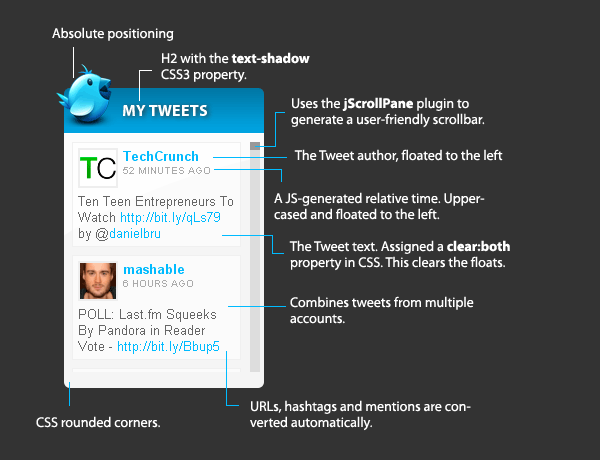
Now lets take a look at the jQuery source.
Step 3 - jQuery
The jQuery front end will communicate with the proxy.php script. Because PHP will handle the communication with the twitter API, the jQuery part will be pretty straightforward.
Here is how it works:
- The ticker loads;
- JS sends a post request to proxy.php with an array of twitter usernames to show (in the tweetUsers array);
- The callback function passed to $.post() will build the markup for the tweets and present them in the twitter widget;
Now here is the code that makes this happen:
demo.html
<!-- In the head section: -->
<link rel="stylesheet" type="text/css" href="demo.css" />
<link rel="stylesheet" type="text/css" href="jScrollPane/jScrollPane.css" />

<!-- Before the closing body tag: -->
<script type="text/javascript" src="http://ajax.googleapis.com/ajax/libs/jquery/1.10.1/jquery.min.js"></script>
<script type="text/javascript" src="jScrollPane/jquery.mousewheel.js"></script>
<script type="text/javascript" src="jScrollPane/jScrollPane.min.js"></script>
<script type="text/javascript" src="script.js"></script>
First, we include our demo.css and jScrollPane.css. These style the ticker.
Later we include the jQuery library from Google's CDN, the mousewheel plugin and the jScrollPane plugin.
Last is script.js, which is shown below:
script.js
$(function(){

    var tweetUsers = ['tutorialzine','TechCrunch','smashingmag','mashable'],
        container = $('#tweet-container');

    $('#twitter-ticker').slideDown('slow');

    $.post('proxy.php', {handles:tweetUsers}, function(response){

        // Empty the container
        container.html('');

        $.each(response.statuses, function(){

            var str = ' <div class="tweet">\
                        <div class="avatar"><a href="http://twitter.com/'+this.user.screen_name+'" target="_blank"><img src="'+this.user.profile_image_url+'" alt="'+this.from_user+'" /></a></div>\
                        <div class="user"><a href="http://twitter.com/'+this.user.screen_name+'" target="_blank">'+this.user.screen_name+'</a></div>\
                        <div class="time">'+relativeTime(this.created_at)+'</div>\
                        <div class="txt">'+formatTwitString(this.text)+'</div>\
                        </div>';

            container.append(str);

        });

        // Initialize the jScrollPane plugin
        container.jScrollPane({
            mouseWheelSpeed:25
        });

    });

    // Helper functions

    function formatTwitString(str){
        str=' '+str;
        str = str.replace(/((ftp|https?):\/\/([-\w\.]+)+(:\d+)?(\/([\w/_\.]*(\?\S+)?)?)?)/gm,'<a href="$1" target="_blank">$1</a>');
        str = str.replace(/([^\w])\@([\w\-]+)/gm,'$1@<a href="http://twitter.com/$2" target="_blank">$2</a>');
        str = str.replace(/([^\w])\#([\w\-]+)/gm,'$1<a href="http://twitter.com/search?q=%23$2" target="_blank">#$2</a>');
        return str;
    }

    function relativeTime(pastTime){
        var origStamp = Date.parse(pastTime);
        var curDate = new Date();
        var currentStamp = curDate.getTime();

        var difference = parseInt((currentStamp - origStamp)/1000);

        if(difference < 0) return false;

        if(difference <= 5)              return "Just now";
        if(difference <= 20)         return "Seconds ago";
        if(difference <= 60)         return "A minute ago";
        if(difference < 3600)            return parseInt(difference/60)+" minutes ago";
        if(difference <= 1.5*3600)       return "One hour ago";
        if(difference < 23.5*3600)       return Math.round(difference/3600)+" hours ago";
        if(difference < 1.5*24*3600) return "One day ago";

        var dateArr = pastTime.split(' ');
        return dateArr[4].replace(/\:\d+$/,'')+' '+dateArr[2]+' '+dateArr[1]+(dateArr[3]!=curDate.getFullYear()?' '+dateArr[3]:'');
    }

});
You can see that on line 27 we use the jScrollPane plugin. It creates a handy scrollbar to the right of the tweets. Thanks to the mouseWheel plugin it is also able to detect and scroll the page on mouse wheel movements.
To change the twitter accounts that are shown in the ticker, you'll need to modify the tweetUsers array.
If you provide two or more twitter names, their tweets will be shown together. Only the 50 most recent tweets from the past 7 days will be returned.
It is worth noting that Twitter puts a maximum limit to the search api's URLs of 140 characters. This would be sufficient for about 7 twitter user names.
Now lets see how the proxy.php script communicates with the Twitter API!
Step 4 - PHP
As I mentioned above, the original version of the Twitter ticker used the old Search API, so there was no need for server-side code. But it is a requirement for the new API which is built over the OAuth protocol. To make things easier, we are going to use a PHP library that makes working with Twitter's v1.1 API a breeze - codebird.php. After you download the library and include it in the folder of the script, you are ready to go:
proxy.php
require_once ('codebird/codebird.php');

// Set a proper JSON header
header('Content-type: application/json');

/*----------------------------
    Twitter API settings
-----------------------------*/

// Consumer key
$twitter_consumer_key = '';

// Consumer secret. Don't share it with anybody!
$twitter_consumer_secret = '';

// Access token
$twitter_access_token = '';

// Access token secrent. Also don't share it!
$twitter_token_secret = '';

/*----------------------------
    Initialize codebird
-----------------------------*/

// Application settings
\Codebird\Codebird::setConsumerKey($twitter_consumer_key, $twitter_consumer_secret);

$cb = \Codebird\Codebird::getInstance();

// Your account settings
$cb->setToken($twitter_access_token, $twitter_token_secret);

/*----------------------------
    Handle the API request
-----------------------------*/

// Is the handle array passed?
if(!isset($_POST['handles']) || !is_array($_POST['handles'])){
    exit;
}

// Does a cache exist?

$cache = md5(implode($_POST['handles'])).'.cache';

if(file_exists($cache) && time() - filemtime($cache) < 15*60){
    // There is a cache file, and it is fresher than 15 minutes. Use it!

    echo file_get_contents($cache);
    exit;
}

// There is no cache file. Build it!

$twitter_names = array();

foreach($_POST['handles'] as $handle){

    if(!preg_match('/^[a-z0-9\_]+$/i', $handle)){
        // This twitter name is not valid. Skip it.
        continue;
    }

    $twitter_names[] = 'from:'.$handle;
}

$search_string = implode(' OR ', $twitter_names);

// Issue a request for the Twitter search API using the codebird library
$reply = (array) $cb->search_tweets("q=$search_string&count=50");
$result = json_encode($reply);

// Create/update the cache file
file_put_contents($cache, $result);

// Print the result
echo $result;
The script receives the twitter handles that it needs to search in the $_POST array. It then creates a cache file that is good for 15 minutes (lower this if you need more real-time results) to minimize the requests that are made to the Twitter API. At the end, it prints out the response as JSON for the front end to handle.
With this the twitter ticker is complete!
Conclusion
Today we used Twitter's new API to build a handy jQuery Ticker that will show your latest tweets on your blog or site. You are free to modify and built upon the code any way you see fit.
Bootstrap Studio
The revolutionary web design tool for creating responsive websites and apps.
Learn more
Martin,
Thanks a bunch for this awesome tutorial, implementation, code-sharing and mash-up.
I'd previously cobbled another api mash-up together for my site, but this one will Definitely soon be replacing that.
In your spirit of giving, I commend, and thank you.
Michael
Nice tuts! <3
Can I experiement and change the width such that it is larger?
This is fantastic! No PHP required? Thanks for this awesome tutorial.
| Follow-UP |
Works exactly as advertised. All the coding, both html and css is very well structured, and extremely easy to tweak, enabling you to meld it into your overall site design quite nicely.
I had entertained thoughts of replacing the little guy, but for now-- I think I'll keep him. He's cute enough to have around.
Again Martin, Kudos and Thanks!
Hey :D Thanx for this wonderful tutorial :D It's really helpful :D
I have a question though... I only want to show one tweet at a time... how do I do that?
Many thanx :D
Greets, Kristel
Thanks for the great comments! Glad you like it.
@ zhu
You can change the width by changing the value at line 21 of demo.css
@ kristel
To show one tweet at a time you'll need to set rpp=1 on line 25 of script.js. This stands for results per page.
@ Michael
Those are some cool customizations you've done there, Michael. It looks great.
Thanx :D You don't know I happy I am with this tutorial ;)
Wow, very nice ^^
Nice widget, thanks!
wohooo
Going to use this on my blogs. Kudos for the good tutorial.
I love the explaining illustrations!
hey,
great tut - really useful and works great. :-)
But I've got a little question: Why do you use "classic" js on lines 21-28? I tried it with jQuery ()- and it works (Firefox 3.5, Opera 10.00, Chrome 3 (so Safari will do as well) and Internet Explorer 7 and 8 [not 6]).
Thanks and greetings,
Linus Metzler
Great tutorial, very helpful.
Is there a way to display a search query and not a specific user. So the end result will be something like the Search Widget? http://twitter.com/goodies/widget_search
Oh, and thanks a lot for this great tutorial! :)
How about performance if other JS is used on the site? I just heared that (could be from Chris from CSSTricks) the twitter api is extremly ressource hungry, but maybe I understood something wrong?
keep up the great work!
@ Linus Metzler
jQuery is fantastic in DOM manipulation, AJAX-es and everything else, but its nice to have some plain-old JS from time to time.
@ Roy
Yes, you can show tweets based on a search. Just remove lines 14-19 and change line 25 to your desired search string. You can show tweets in the widget based on search terms, mentions, trending topics or anything you can think of.
You can use this form to generate the query - http://search.twitter.com/advanced
@ LuK
In this case, performance issues are not likely to arise from the twitter API directly, but rather from the callback function.
It could become a problem if your page is action-packed with JS that is run on page load.
If you notice such an issue, you can always lower the results per page setting on line 25 of script.js - this will lighten the burden on the callback.
impressive, very nice work and integration....
thanks for your work, a really impressive and well-done tutorial!
Very slick! Question though... If you had a bunch of users visit your site, wouldn't this cause you to exceed your twitter API limit? Wouldn't it in that case make more sense to use a server-side script for this then, so you could cache the results and avoid something like that?
@ Evan Byrne
I couldn't find the exact limit per hour for twitter's search API, but you can be assured it is quite high.
Also the limit is IP-bound. This means that no matter how popular your site is, the limit is counted individually for each visitor.
"Yes, you can show tweets based on a search. Just remove lines 14-19 and change line 25 to your desired search string. You can show tweets in the widget based on search terms, mentions, trending topics or anything you can think of.
You can use this form to generate the query – http://search.twitter.com/advanced"
Can you maybe give an example of what exactly the current line looks like, and what the line would look like with the search query inserted?
Because even though you explained it quite clearly, I cannot seem to get it to work. Obviously I'm doing something wrong.
(We are talking about script.js, correct?)
Thanks for a great script.
high quality for this site thx very much ¡¡¡ ^^
@ Beun
Line 25 of script.js should be changed from:
fileref.setAttribute("src", "http://search.twitter.com/search.json?q="+buildString+"&callback=TweetTick&rpp=50");To:
fileref.setAttribute("src", "http://search.twitter.com/search.json?q=YOUR+QUERY+HERE&callback=TweetTick&rpp=50");Change only the q= parameter to your search string. You can also search for a hashtag by setting q=%23MyHashtag. Notice how the # is replaced with %23. It is the same with mentions - just remember to replace the @ with %40
I was just about to ask about hashtags and mentions. It's cool that you support your tutorials.
Thanks
@ Martin
Thanks a lot for the explanation. I now see where I went wrong. It would appear that line 25 in script.js from the downloadable demo.zip, is not the same as line 25 in the explanation at the top of this page.
Thanks!
And If I want to show only the last tweet where I modificate?
Andrei, to show only the last tweet you can change rpp=50 to rpp=1 in script.js on line 25.
working fine thx
Any way to display a feed from a list instead of selecting individual users?
Thanks!
@ TucsonSentinel
After a check with Twitter's API docs, I found a way to show the list updates instead in the widget.
Remove lines 14-19 of script.js in Step 3 and replace line 25 with:
fileref.setAttribute("src", "http://twitter.com/USERNAME/lists/LISTNAME/statuses.json?callback=TweetTick");Where USERNAME is the owner of the list and LISTNAME is the list itself.
Martin,
Tried that code, but it's throwing an error "pastTime is undefined" from the mousewheel handler. ??
I found that adding +OR+@USERNAME into the search parameters at line 25 adds RTs & replies into the results - no need to use the entity code. Looking at the list section of the API, it doesn't look like it's possible to mix the search & list methods. Or is it?
Thx - this is a really cool script.
Many thx !
Great tutorial. Thank you so much. Can i'll link you my test?
Awesome tutorial.. It helped me a lot to create this: Shitty Day
@TucsonSentinel
This error might come from the fact that twitter provides LIST information from a different API, and not the SEARCH API that is used by this ticker.
This means, that it is not guaranteed that it follows the same structure, and from the error you reported I think that it indeed does not.
The only way you could make it work with the LIST API is to manually change each variable used in lines 44-49 in script.js (the TweetTick function), so that it corresponds to the new structure of the tweets.
Or you could wait for Twitter to introduce this functionality in the SEARCH API. Should be available once they allow you to search tweets from certain lists in their site's search.
@simurai
That is awesome. A great design and idea.
Thanks for this excellent tutorial.
How can we change the limit of 7 days for tweets?
@simurai
awesome ! !
Is there a way to show tweets that are older than 7 days?
I'd like to have the ticker show the last 10 tweets regardless of date.
I haven't found anything in the code...
Thanks.
@ George
Unfortunately, it is not possible to show tweets older than 7 days - this is a limit imposed by twitter for their search API.
Is there any way of creating interval for checking the tweets?
For example, to check the tweets every few minutes, and refresh the list.
And would it cause a problem for performance or something?
Thanx.
var tweetUsers = ['tutorialzine','TechCrunch',
002.'smashingmag','mashable'];
003.// The twitter accounts that will be included in the ticker
when I put my accounts name in there, it still shows the posts from the user which was previously shown? what else do I have to change?
I wanted to say, that sometimes not all tweets appear in the search. http://apiwiki.twitter.com/Twitter-REST-API-Method:-statuses-user_timeline might be a hint?
this is quite cool :)
thanks for sharing this nice one!
I have something similar on my website, but to let you combine multiple accounts this wins hands down.
Great tutorial.
looks gr8....will surely try this..
NOT compatible with Opera browser.
Excellent martin, thanks.
I'm wondering if its at possible to show only the last tweet from all users i search for.
Great tutorial, very helpful for a project I’m working on right now.
However, I am having a problem retrieving tweets that are posted via twitter. Is there something I’m missing here?
i still cant figure it out....
the box,as also the tweet icon is being displayed...incomplete of course.... ...but thats sth... but i hav lots of "blanks"...
This is by far one of the best jQuery Twitter Plugins I have seen to date! Exceptional work and thank you for sharing this with us!
Hey,
Great plugin works great!
However, I would like to know if it was possible to get the "latest" from all the users, yet sort it by the latest posted.
For some odd reason now, if I add 3 users:
user1,user2,user3
And user1 makes a tweet, and a few minutes later user2 makes a tweet, it still shows user1's tweet sa the latest.
Great TUT.
A little perplexed by an issue we have.
We have many users on our site. They are registered users. In their profile they have the ability to enter their twitter name.
is it possible to replace the tweetusers string with php user string in the var ?
This is annoying me now lol.
Parsing php variable into js , I know is an issue. Because of the rendering order.
There must be a work around.
Example top of demo.html changed to demo.php
We have:
And in the script.js I have:
var jsvar;
jsvar = ""
var tweetUsers = ['$jsvar'];
Isnt rendering the variable within the javascript, so obviously the php is executing silently on the server and not parsing clientside via the js
To get lists working its fairly simple:
TweetTick function
Sorry, not sure what the syntax for code block is over here. Contact me if you need working lists for this script.
Great script btw!
Hey, guys, the tutorial is very helpful, but here is the thing.
How could I use the twitter ticker as plugin and put it in the sidebar of my blog? I'm using wordpress
If we are unable to show more then that past 7 days, how about adding something that shows a message that says "No tweets in the last 7 days" and adjusting the height of the empty white/gray box so it doesn't look so 'empty' when people are away from their twitter for over a week.
Any suggestions on how to do this?
@George and @Cosa Nostra
I found a way to add a custom message if you haven't got any tweets for the last 7 days. Just add the following code in this function ( function TweetTick(ob) ) above the line which says ( container.jScrollPane(); ), which is roughly around line 41 of script.js
if(ob.results.length < 1){
container.append('Oops!We haven\'t been tweeting for the last 7 days!View our older tweets instead');
}
You should then be sweet to share an empty tweet!
Actually you don't need <div> tags to get this to display. Just replace the single quotes with double in your txt string.
Ok, my previous post was formatted incorrectly!
You will need to get your error message (ie. "Oops, etc.") to reside inside some div tags, namely div class="tweet" and then div class="txt"
Could we use setInterval property to have it load tweets at a regular interval? Where should we execute it?
Well done!!
Great tutorial. Looks sexy. Thanks, Bob
This is a great plugin, I'm definitely looking forward to working further with it.
I'm having an odd issue though where it takes forever for changes to show up in chrome/firefox or not at all. I make changes and in IE it shows up instantly.
www.calamusandsinew.com/twitterticker.html
Fixed.
Tried using this on a site and the regex for converting URLs into links needs updating. It would break if there was a "-" anywhere in the url. For example, if my feed has a URL like www.example.com/how-to-play-baseball, the link would convert into www.example.com/how and cut off everything after the hyphen. If you replace the regex on line 48 within the formatTwitString function with this: "/((ftp|http|https):\/\/(\w+:{0,1}\w*@)?(\S+)(:[0-9]+)?(\/|\/([\w#!:.?+=&%@!-\/]))?)/gi", you should be good. Love this application, keep up the great work!
Awesome twitter feed, I've used this on my sites. One part that was overlooked which is a minor thing is the urls that has a " - " dash in it, the link get broken. I've managed to fix it so here is the solution just in case you run into this problem
function formatTwitString(str)
{
str=' '+str;
str = str.replace(/((ftp|https?):\/\/([-\w.]+)+(:\d+)?(\/([-\w/_.]*(\?\S+)?)?)?)/gm,'$1');
str = str.replace(/([^\w])\@([\w-]+)/gm,'$1@$2');
str = str.replace(/([^\w])#([\w-]+)/gm,'$1#$2');
return str;
}
Once again awesome twitter feed.
Fantastic, even made it into a Joomla plugin!
This is awesome. Exactly what I needed, thanks, you made my client happy :-)
I made an improvement so you can have accounts and hash tags.
here it is, hope you find it useful
$(document).ready(function(){
// only add 'from:' if it does not begin with %23 - # hash
if (tweetUsers[i].indexOf('%23') != 0) buildString+='from:';
buildString+=tweetUsers[i];
}
});
I'm a newbie and it's probably a stupid question, but after installing this jQuery Ticker (which is by the way the most beautiful I've found on the net: kudos!) in unmodified form, by uploading the "demo.zip" it in my Wordpress 3.2.1 website, I got the message that the plugin does not work because it has no legitimate "header"…
The plugin is invisible and cannot be activated.
What do I need to do?
Hope somebody can help! I really searched the internet for instruction on other ways to install this plugin, but to no avail…
Thanks in advance...
hi, i have question about this:
can I modify this ticker only for 1 twitter ID just like twitter profile?
can I make more than 1 ticker windows for each twitter ID that I want to show in my web with CSS? for example, 4 to 12 tickers (each with 1 profile to show)
thanks
Hey everbody. Quick question; why doesn't this work on newer jQuery libraries, like 1.6.2?
Today I ported this nice peace of code to WP widget. You can find it here: http://wordpress.org/extend/plugins/my-twitter-ticker/
Thank you once again.
Thanks for the WP port Csaba! Send me a link, I'd like to make a donation.
Thanks Martin - just brilliant, any chance of a matching version that reads RSS feeds?
Hi, This is great thank you! I was wondering if there were a way to move the tweet text up next to the avatar, but below the username & time? Thanks again for this!
It seems that the latest version of jScrollPane breaks this.
This is incredibly helpful for newbie to Twitter and jQuery. I had figured out my search and got the results I wanted but was a bit stuck on how to display the results. This was exactly what I needed. Thank you for making it fun!
I do have a question the answer to which I did not see in the comments.
I would like to display more than two initially. I understand rpp will deliver whatever number I set there (e.g. 1 or 50 or 79), but I want my visitor to see five rather than two and having trouble figuring out where that display number is set.
Figured this out....change the height of "#twitter-ticker" in the CSS
Thanks again for explaining all this - am excited to get it implemented!
Hi, Thanks a lot! It was really easy and it looks great!!!!
I tried to integrate this script into my site with jquery 1.7.1 and got error of "Uncaught TypeError: Cannot read property 'top' of null"
Can u help with this message?
many thanks for this well explained plugin !!
The tickr doesn't seem to display tweets from my twitter account!!
Guys this is working with all twitt users but just mine not @GladyVocals. Do you know why?
I test with a lot users and worked..
Love this script. Has anyone found a way to display the scrollbar and contents horizontally? I updated to the new version of jScrollPane, but haven't figured out a solution yet.
I posted used this feed and it works great... but it is conflicting with something else and will NOT scroll... any helpful hints on what to look for will be soooo appreciated!
Thanks for the tool~
Martin,
I am willing to pay you to do the following:
Why do you now have to connect your twitter account to your facebook account (under profile) in order for your tweets to publish in this feed? I don't understand this. Can anyone shed any light on this??
Hi,
I love this twitter ticker and have been using it on my Wordpress site. Since I updated to the latest version of Wordpress last week it has stopped working and tweets do not update within it. Do you know why this may be and are there any plans to update it?
Thanks
Is possible this app make a auto-refresh ? If I post a tweet this app automatic refresh on my web site ?
Thanks
I like to first say thanks for sharing this awesome twitter ticker. I am using it in my web app using jQuery Mobile/AJAX. I am using an internal page structure that uses divs as internal pages that are loaded via AJAX. I was able to get it working but when I load the page the background frame and image load with no tweets. If I refresh the page manually the tweets load. Also, when I only use my twitter username in script.js as a parameter it only loads one tweet. I was able to add other usernames in the script as parameters and it loads a sufficient amount of tweets. I think I need a way to auto refresh the internal page before its shown so the tweets will display when loaded. Also, on what Leo commented on above if you could explain how to impliment an auto-refresh at intervals. Any help and code examples would be greatly appreciated.
Thx you a lot !!
You need to upgrade jScrollPane (http://jscrollpane.kelvinluck.com/) to use last jQuery (1.8.2)
New header code demo :
<link rel="stylesheet" type="text/css" href="script-twitter.css" />
<link rel="stylesheet" type="text/css" href="jScrollPane/jquery.jscrollpane.css" />
<script type="text/javascript" src="//ajax.googleapis.com/ajax/libs/jquery/1.8.2/jquery.min.js"></script>
<script type="text/javascript" src="jScrollPane/jquery.mousewheel.js"></script>
<script type="text/javascript" src="jScrollPane/jquery.jscrollpane.min.js"></script>
<script type="text/javascript" src="twitter.js"></script>
<!--[if lt IE 7]>
<style type="text/css">
div.tweet {
background:none;
border:none;
}
div#twitIcon{
filter:progid:DXImageTransform.Microsoft.AlphaImageLoader(src=img/twitter_64.png, sizingMethod=crop);
}
div#twitIcon img{
display:none;
}
</style>
<![endif]-->
See ya ! :)
Hi,
why I can see some people's tweets and some others I can't (it is not a problem with this plugin, I even cannot get any results using twitter's search box)? Their account is not private.
Hi,
I have a similar question, it might be a problem of a added "link" in the tweet, I mean it might be "t.co link wrapper" problem?
While the tweets with "t.co" are displayed properly, the tweets with other URL are not. To fix the problem, I am not sure at the moment how to change some code in the javascript.
Were you ever able to resolve your problem xpanta? It sounds like I'm having a similiar problem with my Twitter account, which I can't resolve. Thanks
thanks for the great tutorial, I will add it to my blog.
thanks a lot, great tutorial and tool!
Not sure why, but this was working perfectly on my site just a few days ago. I noticed that if I change the Tweetuser to something other than my twitter account it works just fine. If anyone has experienced any problems associated specifically with their twitter name I'd greatly appreciate any input or suggestions. Thanks in advance!
Hi, thanks for this development, i wanted to know if i can show tweets from before 7 days ago , is there any way to do this?
Martin,
I have a site that has many Jquery UI plugins. Can't seem to get the 1.3.2 to work with my 1.8.3. I know 1.3.2 is the culprit as I have removed it and the the other functions work again. Any ides?? Why can't it use the latest version of Jquery?
Never mind. Fixed using no conflict feature.
Is there any way of displaying tweets from the past month?
Hi,
thanks for this tutorial!
I had some issues, the script is showing only 2 tweets, from Feb 13th, but i tweeted also before and after this date (see: https://twitter.com/fiDesign_de)
See it here in action: http://fi-design.de/blog.html
Most interesting technique, will be using it on all the sites!
Any chance this script get updated to twitter api 1.1 since 1.0 will be disabled soon?
This just stopped working yesterday. Even your demo stopped working. Did Twitter change something?
Hi -
My implementation of this ticker is now experiencing the same symptom as your demo - the tweet container is just showing the loading animation. There are no reported issues with the API. I'm guessing there may have been a recent change in the API deprecated in this project. Any ideas?
It seems to be resolved now. May have been a Twitter issue.
The api version 1.0 are disabled now.
I purchased a theme using your ticker and it's broken.
Apparently Twitter is using a new API version.
I'm sure you know this ... can you tell us, how we can fix this? Is it simple or do you need to create a new tool?
Thanks,
Daniel
Hi Folks
Twitters API 1.0 is no longer supported and it appears 1.1 requires Authentication.
I have no idea how to do this but some articles I have found explain this.
If anyone can modify the code above to work with 1.1 Authentication it would be appreciated by all I think.
Sorry I'm no help with code but I have no coding experience.
http://www.webdevdoor.com/php/authenticating-twitter-feed-timeline-oauth/
http://www.webdevdoor.com/javascript-ajax/custom-twitter-feed-integration-jquery/
Regards
Andrew
I've gone through this a few times now...It appears that all we need to do for the demo to work exactly as downloaded is to add the consumer key and secret key and the access tokens to the proxy.php. Is this correct? Or am I missing another step? I cannot get the demo to work with adding my keys into the proxy.php.
Hi Stacie,
Have you had any luck yet? I can't get the demo to work either when I add the keys to proxy.php.
ATTENTION
PHP 5.3 required for this functionality.
Note that the proxy.php and codebird.php require PHP 5.3 server side to function.
@jamie and @stacie this is likely your problem.